
Q: How do I connect my OTTO AMR to a WPA3 WiFi network?
A: As of V2.34.4 of the OTTO firmware by default, the OTTO AMR software is not compatible with WPA3, so you'll need to use the following workaround to get it to connect:
- Connect an Ethernet cable between the robot and a laptop.
- Navigate to
http://10.255.255.1:8090, then type in and save the WiFi and IP settings. (WiFi won't connect at this stage.) - Open a Windows command prompt and SSH into the robot:
ssh administrator@10.255.255.1- Edit the WiFi configuration file:
sudo nano /etc/wpa_supplicant/wpa_supplicant.conf- Add or edit the following lines:
#Accept both SAE (WPA3) and WPA-PSK (WPA2) key_mgmt=SAE WPA-PSK # PMF optional (required for SAE, optional for transition mode) ieee80211w=1 priority=10It should look like this:
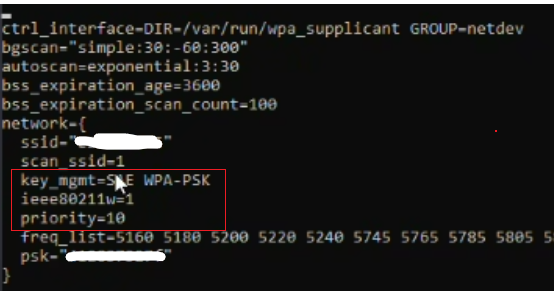
- Be sure to enter the correct access point name (ssid) and password (psk) in the appropriate fields.
- Save and exit by pressing Ctrl + O then Ctrl + X.
- Restart the WiFi service:
sudo systemctl restart netplan-wpa-wifi0- Ping the Fleet Manager (FM) to confirm the connection. If it doesn't connect, recheck the settings above.
Q: Is there anything I should avoid doing after connecting?
A: Yes. Once the robot is connected to WiFi, avoid using http://10.255.255.1:8090 to update the WiFi and IP settings, as it could overwrite the configuration above. Connecting with the Fleet Manager (exchanging VPN keys) is fine.