
Why?: Keeping software identical across machines is hard — OS updates, library versions, and config drift break things that worked yesterday. A container packages an app with everything it needs, so it runs the same on any host: build once, run anywhere. On OptixEdge, the built-in Docker engine runs your containers right alongside the Optix runtime and Remote Access — one DIN-rail box instead of a separate PC per job. (Think shipping containers: one standard box any crane can handle, versus custom-built boats and ports for every odd-shaped cargo.)
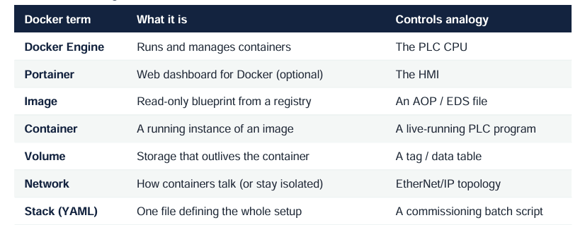
The vocabulary, in controls terms
Security rules that aren't optional: Hosting containers makes your gateway an app server. The engine runs rootless by design, but that doesn't replace the basics and Rockwell is blunt that deploying only trusted, hardened images is on you:
• Don't expose management ports to the internet the Portainer HTTP port (9000) is open to man-in-the-middle attacks.
• Never use the unencrypted Docker port (2375) in production it's unauthenticated. Use the encrypted, certificate-based option (2376). Running Docker Containers on OptixEdge
• Skip SSH inside containers, guard backplane access (it extends to everything in the container), and pull only from trusted registries